

Premium Ads
Any individual or business who meets Quikr’s Listing policy and Terms of Use can opt for Quikr’s Premium Listings.
Premium ads help you make your ad more visible, reach out to more consumers and sell your product or service faster.
To opt for a Premium ad, you need to first start posting your ad on Quikr. As part of the Post ad flow, you will have an option to either post your ad as a free ad or a Premium paid ad. At this stage, you can select for a Premium ad option.
There are 2 types of Premium ads: Top of the page ad and Urgent + Top of the page. An Urgent + Top of the page ad gives you a top position on the respective category page while also providing you with a star on your ad. Top of the page ad gives you the same position but without the urgent banner
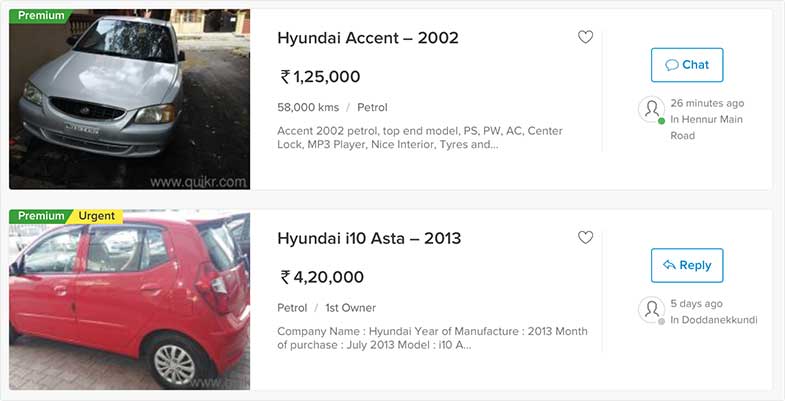

All Premium Ads are easily recognizable.
Top of the page ad: As the name says, they appear right at the Top of each category’s ad results. They are further highlighted in blue for increased visibility.
Urgent + Top of the page ad: They are indicated by a green star before the title and have all the other advantages of a Top of the page ad
You will see these symbols on the browse page, View ad page and in your My Quikr section.
Currently, we offer 3 modes of payment options for Premium ads:
- Credit/Debit/Cash Card payment.
- Cheque payment.
- Payment through Quikr’s Ad Credits.
You can choose either of these options to pay for your Premium ad. More details about these are part of the Post Ad process on Quikr.
All ads on Quikr stay on site for 90 days as long as they meet the Listing Policy and Terms Of Use of the website. All Premium ads currently whether Top Of Page or Urgent stay as a Premium ad on the website for 30 days. And after the first 30 days they continue to be active on the site for another -30 days as a normal ad. ( Not in a premium position )
All Premium ads go live to site after 24 Hours of the ad being posted. However, in case you opt for a payment option by cheque, your Premium ad will get active on the website only after the cheque is encashed by Quikr.
Yes you can check your Premium ads as well as edit them when required from My Quikr.
No you cannot. That would be misleading and would not be very helpful as the ability for relevant consumers to see your ad in the right category would be lost. Thereby losing all the benefits of the Premium ad position. You may also be penalised by Quikr for doing so.
Yes, in the first 5 days after your Premium ad goes live on Quikr, you can edit your Premium ad through the Paid ads section in My Quikr.
Yes, you can continue to post free ads on Quikr.
Yes, you can renew your Premium ad after 30 days.
Listing Fees for your Premium ad are NOT refundable, except in the instance of deletion of the ad by Quikr at the time of review (within 24 hours of it being posted) due to violation of Listing Policy/ Terms of Use or miscategorization of the ad. See Premium ads fees.
Hope the above information has been helpful in better understanding how Quikr’s Premium ads work. If you have any other question or need any help, please write to us at support@quikr.com and we will get back you soon.